
DJI

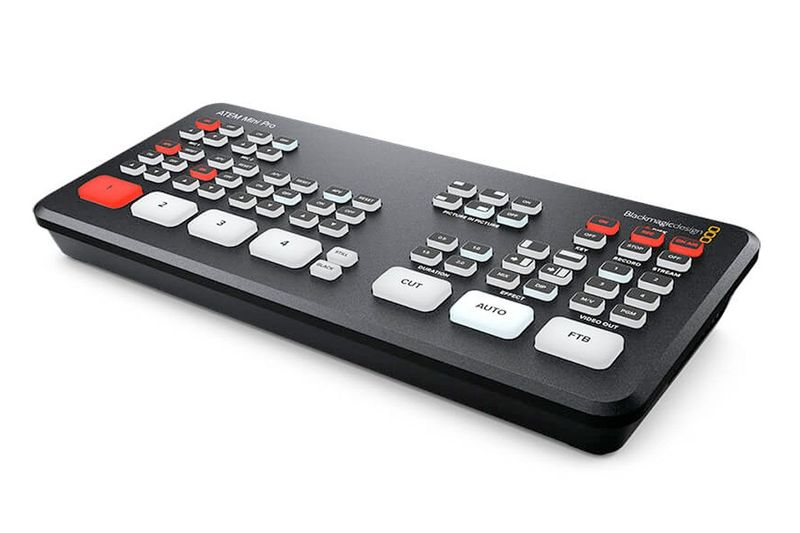
Blackmagic ATEM Mini Pro Switcher

Key specs

  • 4 HDMI inputs
  • Direct livestreaming via Ethernet
  • Direct recording to USB drives in H.264
  • Multiview to monitor all sources
  • USB output functions as a webcam

Rental price

500,000 VND/day

350,000 VND/session

Number of days
1
Subtotal (1 day)500,000 VND

Simple rental process

  • What to bring

    Your passport (or Vietnamese ID card) and a security deposit that depends on the gear.
  • Pickup & return

    Open 7:30 – 22:30 every day; pick up and return at times that suit you.

  • Pickup address

    132 Nguyễn Đức Trung - Thanh Khê - TP. Đà Nẵng Get directions →

  • Payment

    Pay at least 30% when you pick up. A half-day session costs 70% of the daily rate.

Read our rental policy →

Blackmagic ATEM Mini Pro Switcher – full details

Looking to rent a Blackmagic ATEM Mini Pro HDMI live stream switcher in Da Nang? The Blackmagic ATEM Mini Pro is a compact 4-input HDMI video switcher that allows live switching between multiple cameras or computers, embedding logos, and direct streaming to YouTube or Facebook via Ethernet. It also records the live stream directly to USB drives, features a multiview monitor display for all sources, and functions as a USB webcam for Zoom and OBS. At Đà Thành Camera Rental, the price is 500.000đ/day or 350.000đ/session.

Thuê bàn trộn Blackmagic ATEM Mini Pro tại Đà Nẵng

What is the Blackmagic ATEM Mini Pro switcher used for?

  • Conference and seminar live streaming: switch between 2–4 cameras.
  • E-commerce live streaming: cameras and presentation slides.
  • Weddings and events: live stream to guests far away.
  • Online webinars: use as a webcam input for Zoom.
  • Multi-camera podcasts: switch camera angles live.

Blackmagic ATEM Mini Pro Specifications

  • Inputs: 4 x HDMI
  • Outputs: HDMI (program or multiview), USB-C webcam
  • Live streaming: via Ethernet port
  • Recording: directly to USB flash drives (H.264)
  • Audio: 2 x 3.5mm stereo mic inputs
  • Built-in transitions, picture-in-picture, keyers

Multi-camera live streaming used to require an entire broadcast van. With a compact switcher like the Blackmagic ATEM Mini Pro, a single operator can switch between camera angles, overlay slides or logos, and stream directly using a compact desktop unit. It is a popular solution for conferences, live-streamed weddings, and online sales events.
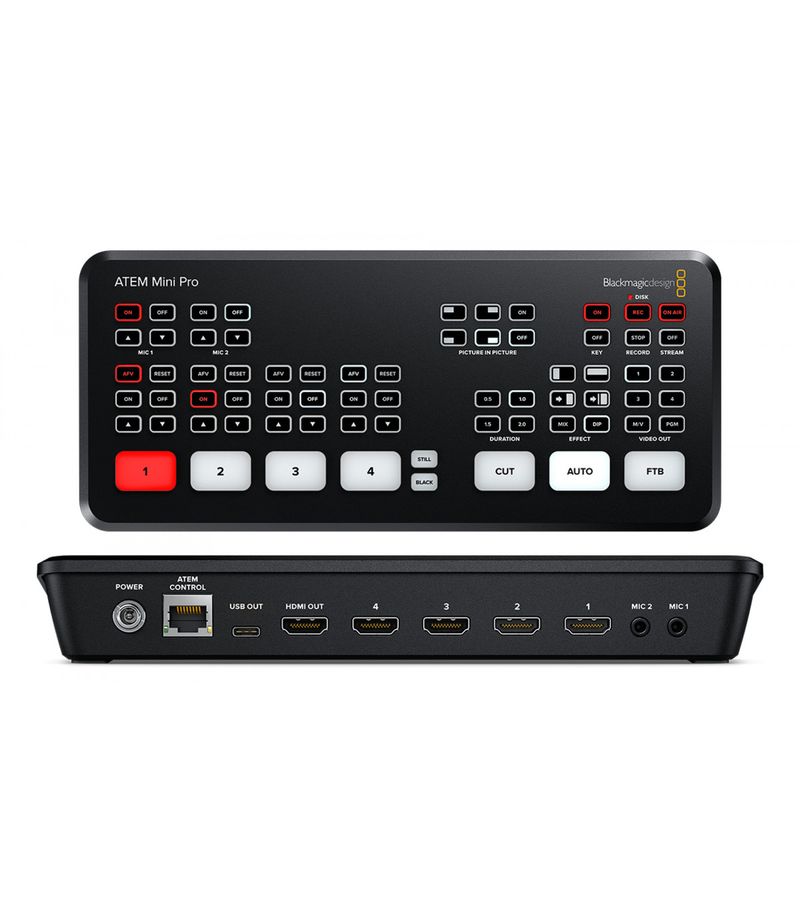
Bàn trộn Blackmagic ATEM Mini Pro cho thuê – Đà Thành Camera

Basic live stream setup with Blackmagic ATEM Mini Pro

A typical conference live streaming setup can be configured as follows:

  • Connect 2–3 cameras via HDMI to the switcher, with a laptop for slides connected to the remaining HDMI input.
  • Plug audio from microphones or an audio mixer into the switcher’s mic input.
  • Connect an Ethernet cable to stream directly to YouTube or Facebook while simultaneously recording to a USB drive.

Blackmagic ATEM Mini Pro rental package includes

  • 01 ATEM Mini Pro switcher
  • 01 12V power adapter
  • 01 Carrying case

How to set up a live stream with Blackmagic ATEM Mini Pro

  1. Power on the switcher and connect your cameras to the HDMI inputs.
  2. Connect a display to the HDMI output and set it to multiview mode.
  3. Plug your mic or mixer audio feed into the 3.5mm mic input.
  4. Configure your streaming settings via the ATEM Software Control on a computer and connect the Ethernet cable.
  5. Run a private test stream before going live publicly.

Tips to prevent live stream disruptions

Stream failures are most commonly caused by network or audio issues:

  • Use a stable wired Ethernet network with sufficient upload speed.
  • Turn off camera HDMI OSD info overlays for a clean video feed.
  • Have a dedicated team member monitor audio via headphones throughout the stream.

Who should rent the Blackmagic ATEM Mini Pro switcher?

  • Recommended for: corporate events and conferences requiring multi-camera streaming.
  • Recommended for: e-commerce live streaming setups.
  • Recommended for: conference or wedding live streams using 2–3 cameras such as the Sony A7 III paired with DJI Mic 2 wireless mics.
  • Consider: single-camera streams generally do not require a dedicated switcher.

Best practices for using the Blackmagic ATEM Mini Pro

  • Test the complete setup at least 1 hour before going live.
  • Set all connected cameras to the exact same resolution and frame rate.
  • Use high-quality HDMI cables and avoid excessively long runs.
  • Pre-load logos, graphics, and hold screens before broadcasting.
  • Record the program stream to a USB drive as a backup copy.

Frequently Asked Questions

How much does it cost to rent a Blackmagic ATEM Mini Pro switcher in Da Nang?

At Đà Thành Camera Rental, the rate is 500.000đ/day or 350.000đ/session. Multi-day rentals or equipment bundles receive discounted rates; call 0345.878.879 for a quote.

Do I need a computer to live stream?

No, the unit streams directly via Ethernet; a computer is only needed for initial setup.

Which cameras are compatible?

Any camera offering a clean HDMI output, such as the Sony A7 IV.

Can I send wireless video signals to the switcher?

Yes, by using a wireless system like the Accsoon CineView 2 SDI wireless video transmitter.

Rent the Blackmagic ATEM Mini Pro Switcher at Đà Thành Camera Da Nang

All equipment is cleaned, fully tested, and packed with standard accessories before delivery. Upon pickup, we recommend testing it with your cameras or lighting using the steps outlined above. Call 0345.878.879 or visit 132 Nguyễn Đức Trung, Thanh Khê, Đà Nẵng to reserve. Explore more filming accessories for rent, or bundle your rental with filming gear and cameras.